2025/12/04 10:58
Why WinQuake exists and how it works
RSS: https://news.ycombinator.com/rss
要約▶
本文
Dec 3, 2025 Why WinQuake exists and how it works
When I took a look at the history of Quake binaries, they all made sense to me. quake.exe was the original release, able to run on DOS and Windows 95. Then came vquake.exe to support the hardware accelerated chip Vérité 1000. Later, glquake.exe generalized hardware acceleration to any vendor providing OpenGL drivers. And to revolutionize Internet deathmatch, id Software released QuakeWorld server and client (qwsv.exe and qwcl.exe).
However, I could not figure out the point of winquake.exe. Until now. Here is what I understood and a little bit of a dive into how it works.
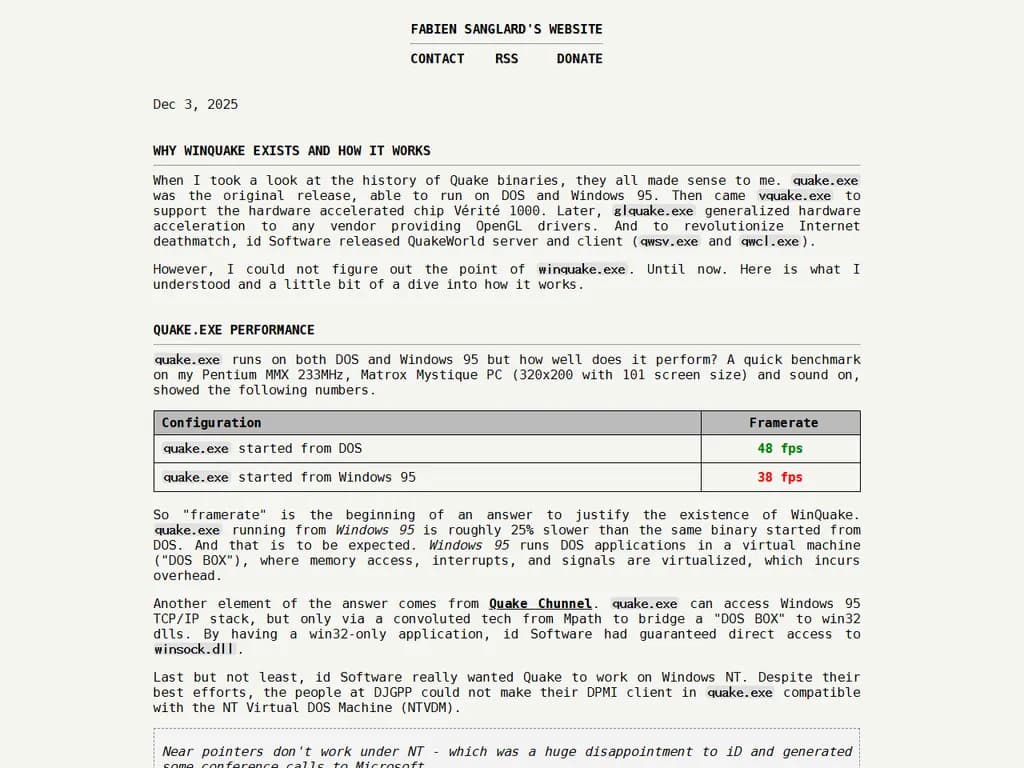
Quake.exe performancequake.exe runs on both DOS and Windows 95 but how well does it perform? A quick benchmark on my Pentium MMX 233MHz, Matrox Mystique PC (320x200 with 101 screen size) and sound on, showed the following numbers.
Configuration
Framerate


quake.exe started from DOS


     48 fps


quake.exe started from Windows 95


     38 fps
So "framerate" is the beginning of an answer to justify the existence of WinQuake. quake.exe running from Windows 95 is roughly 25% slower than the same binary started from DOS. And that is to be expected. Windows 95 runs DOS applications in a virtual machine ("DOS BOX"), where memory access, interrupts, and signals are virtualized, which incurs overhead.
Another element of the answer comes from Quake Chunnel. quake.exe can access Windows 95 TCP/IP stack, but only via a convoluted tech from Mpath to bridge a "DOS BOX" to win32 dlls. By having a win32-only application, id Software had guaranteed direct access to winsock.dll.
Last but not least, id Software really wanted Quake to work on Windows NT. Despite their best efforts, the people at DJGPP could not make their DPMI client in quake.exe compatible with the NT Virtual DOS Machine (NTVDM).
Near pointers don't work under NT - which was a huge disappointment to iD and generated some conference calls to Microsoft.
- Charles Sandmann[1]
How winquake.exe worksA fun way to start exploring is to first read WQREADME.TXT and then take a look at all the modes available in winquake.exe. They are configured with the script wq.bat.
Options for running WinQuake: wq max: all features on, but doesn't work on all systems wq fast: maximum speed, but doesn't work on all systems wq fastvid: maximum video speed, but safer, probably slower sound wq fastsnd: maximum sound speed, but safer, probably slower video wq safe: very likely to run, but may be slower wq verysafe: almost sure to run, but probably slower, and no sound
Here are the numbers I got for each mode, still with the same Pentium MMX 233MHz machine and same configuration.
Configuration
Framerate


wq max
42.4 fps


wq fast
41.8 fps


wq fastvid


     45.0 fps


wq fastsnd
41.8 fps


wq safe


     45.0 fps


wq verysafe


     40.0 fps*
Impressive. winquake.exe managed to bring up the framerate within 6% of quake.exe running on DOS. Mission accomplished. But how does it works?
winQuake.exe backendsEach "mode" is configured via command-line flags. This part reveals there are three types of backend for input controls, audio, and video.
max winquake -dinput fast winquake fastvid winquake -wavonly fastsnd winquake -nodirectdraw -nowindirect safe winquake -wavonly -nodirectdraw -nowindirect verysafe winquake -dibonly -nosound -nojoy
Amusingly, the mode that provides the highest framerate, fastvid keeps everything default but disables an audio backend!
"fastvid" was also the name of a tool to fix the Pentium Pro abysmal video write speed on chipset that shipped with buggy "Write Posting". The option in qw.bat has nothing to do with it.
Audio backendsWinQuake can send its sound effects (the music comes from CD tracks) using two audio backends (with -nosound disables sound effects altogether).
The two backends are DirectSound (dsound.h from DirectX) and what id calls wave sound which is in fact winmm.h, the Windows MultiMedia audio API, dating back to Windows 3.1.
If DirectSound is available, WinQuake uses it to provide the lowest latency. However this backend has a higher impact on the CPU and results in 10% lower framerate. With -wavonly, users can force usage of WinMM which results in higher latency but higher framerate.
Input Control backendsTo read user inputs, WinQuake uses either DirectInput (dinput.h from DirectX) or the legacy Windows API winuser.h.
By default WinQuake uses winuser.h but usage of DirectInput can be requested via -dinput for slightly smoother motion and responsiveness to fast spinning motions. I suspect it was not enabled by default for cases where DirectX was not installed or perhaps fear of driver problems.
Joystick inputs are handled with joystickapi.h. Likewise, it seems drivers may not have been stable since id provided a way to disable it with -nojoy.
Video backends The part that was the most interesting to me was the video backends. WinQuake can operate in five modes using GDI, VGA, VESA, Accelerated VESA, or DirectDraw.
DIB video backendThe Graphics Device Interface (GDI) (wingdi.h) is the foundation to render anything on the desktop in Windows 95. Applications usually did not use it directly but instead called winuser.h (which in turns used low-level wingdi.h).
WinQuake can render to a Device-Independent Bitmaps (DIB) which is a surface to be blitted towards a window though GDI. The surface can be of any dimension so there are no "display mode" to detect here, WinQuake hardcodes its DIB modes to square-pixel resolutions 320x240, 640x480, and 800x600.
Because it is using Windows "by the book", DIB mode is the safest mode that should always work. It is also the slowest way to render to the screen because WinQuake first renders to a DIB that is then sent to the GDI and then sent to the video card.
While slower, it is not devoid of hardware acceleration. Many graphic cards wanting to perform well under Windows 95 had hardware acceleration implementation of crucial functions such as bitBlt.
Finally, DIB mode is the only one able to render in "windowed" mode. Every other mode takes over and renders in "fullscreen" mode. Note that DIB can also render in pseudo-full screen if WinQuake is started with dibonly but this is "faked" with a borderless window covering the whole screen.
SciTech's Multi-platform Graphics Library (MGL)For everything not DIB, WinQuake uses SciTech's MegaGraph Graphics Library. It was a rather expensive lib ($499 in 1997, $1,000 in 2025)[2] but well worth its price because it brought order into the chaos that was the world of video systems in 1997 if a game operated outside GDI.
WinQuake could find itself having to deal with the following types of video systems.
- VBEAF : VESA Accelerator Function
- VBE2 : VESA Linear Frame Buffer for direct to VRAM write/read.
- DirectDraw : Only available if DirectX is installed.
- StandardVGA : That good ol' VGA video mode.
When it starts, WinQuake registers the drivers it wants MGL to load (see registerAllDispDrivers). MGL then lists all supported resolutions and pick the highest performance drivers to access each of them (in the order list above).
void registerAllDispDrivers(void) { /* Even though these driver require WinDirect, we register
- them so that they will still be available even if DirectDraw
- is present and the user has disabled the high performance
- WinDirect modes. */ MGL_registerDriver(MGL_VGA8NAME,VGA8_driver);
if (useWinDirect){ MGL_registerDriver(MGL_LINEAR8NAME,LINEAR8_driver); if (!COM_CheckParm ("-novbeaf")) MGL_registerDriver(MGL_ACCEL8NAME,ACCEL8_driver); }
if (useDirectDraw) { MGL_registerDriver(MGL_DDRAW8NAME,DDRAW8_driver); } }
The list of modes and which driver was selected by MGL is available via the command vid_describemodes in Quake console. In the screenshot below, we can see almost the full house of drivers VGA8.DRV, DDRAW.DRV, LINEAR8.DRV, and the windowed DIB modes.
Quake fast mode.
Quake dibonly mode.
Quake nowindirect mode.
Quake nodirectdraw mode.
I had never heard of VBE/AF before reading MGL source code. As far as I understand, it never gained much traction and few vendors wrote drivers to support it.
Many games used MGL: WinQuake, Hexen II, Grand Theft Auto, Maui Mallard in Cold Shadow, Total Mayhem, Balls of Steel.
DirectDraw video systemMicrosoft was very much aware that GDI was fine for applications but not enough for video games. Already in Windows 3.1 they had released a game developer SDK called WinG to give a more direct fullscreen access to the screen. The second version of WinG was renamed DirectX and contained the 2D fullscreen API which they called DirectDraw.
Although safer and more reliable, Microsoft Windows imposed many restrictions on applications. One result of this situation was that games, and other high-performance graphics applications, could no longer access the hardware resources directly in order to maximize performance and expand functionalities. For several years game programmers continued to exercise the craft in DOS, and Windows users had to switch to the DOS mode to run games, simulations, and other graphics programs. The resulting situation implied a major contradiction: a graphical operating system in which graphics applications would execute with marginal performance
The first effort in this direction was a product named WinG, in reference to Windows for Games. WinG was first made available in 1994 and it required Win32 in Windows 3.1. Its main feature is that WinG enabled the game programmer to rapidly transfer bitmaps from system memory into video memory. This made possible the creation of Windows games that executed with much better performance.
Microsoft renamed the new version of the Game SDK, calling it DirectX 2. Other versions later released were named DirectX 3, DirectX 5, DirectX 6, and currently, DirectX 7.
- Feng Yuan, "Windows Graphics Programming Win32 GDI and DirectDraw"
In terms of performance, DirectDraw was a step up from GDI but it was also not guaranteed to work due to driver bugs or if the user had not installed DirectX. It can be disabled with nodirectdraw.
WinDirect video systemReaders may have picked up on something written earlier that was blatantly wrong. Direct access to the hardware is forbidden to Win32 applications. So how is MGL able to bypass GDI/DirectDraw and directly hit VBEAF, VBE, and VGA?
That is possible thanks to the secret tech from SciTech called WinDirect. How it works is explained in SciTech MGL Reference Guide v4.pdf.
What is WinDirect?
A key component of the SciTech MGL, WinDirect is a runtime package for DOS and Windows 95 that provides direct access to the display hardware for both 16 and 32-bit applications. Traditionally Windows applications have had to perform all graphics output using the standard Graphics Device Interface (GDI). Although the GDI is very extensive and powerful, it is also not particularly fast for the sort of graphics that real time applications like interactive video games require.
WinDirect breaks this barrier by allowing high performance applications to shut down the normal GDI interface, and to take over the entire graphics display hardware just like you would normally do under DOS. Once GDI has been shut down, interactive graphics applications can re-program the display controller and write directly to video memory. A WinDirect application can program any standard VGA graphics mode such as 320x200x256, it can re-program the controller and run standard VGA ModeX style graphics, or it can call the standard VESA BIOS services to run high resolution SuperVGA graphics.- MGL v4 Programmer Guide[3]
MGL v4 programmer guide, is a treasure strove of information. If, like me, you wondered what were these WDIR32.DLL and WDIR16.DLL libraries that came with WinQuake, the doc mentions them (WinDIRect). Likewise, the doc describes PMPRO16.DLL and PMPRO32.DLL as DOS extender independent API for protected mode services. Michael Abrash's Zen Timer is also mentioned in there :)!
WinQuake source code does not include MGL. Only the headers and a pre-compiled 32-bit MGLLT.LIB (MGL Lite) are provided to allow compilation. SciTech did eventually publish the source in 2000[4] but it is no longer available. What was uploaded on GitHub[5] is v5 which by then had dramatically changed (e.g: WinDirect was gone).
Luckily a kind soul has mirrored MGL v4. If you want to do your own digging, install mglb405.exe and mgls405.exe. Or just download my installation, src.rar.
Putting it all togetherOverall, winquake.exe was often able to find a fast rendering path, either through DirectDraw or WinDirect. The fallback to DIB mode was not ideal but still a win compared to quake.exe. Add to that the ability to select a sound backend to optimize for framerate or audio latency and the result was a damn good experience that completely justified the effort.
More than 30 years later, you can still run winquake.exe on Windows 11. Fullscreen does not support widescreen but the windowed mode still works flawlessly. As much as Microsoft has been questionable lately, their commitment to backward compatibility is impressive.References^ [1]Why did ID choose DJGPP for Quake?^ [2]SciTech's MGL price^ [3]MGL v4 Programmer Guide^ [4]SciTech Releases MGL 4.0 OpenGL Source Code^ [5]SciTech Mult-platform Graphics Library *